 SAME DAY & EXPEDITED SHIPPING AVAILABLE






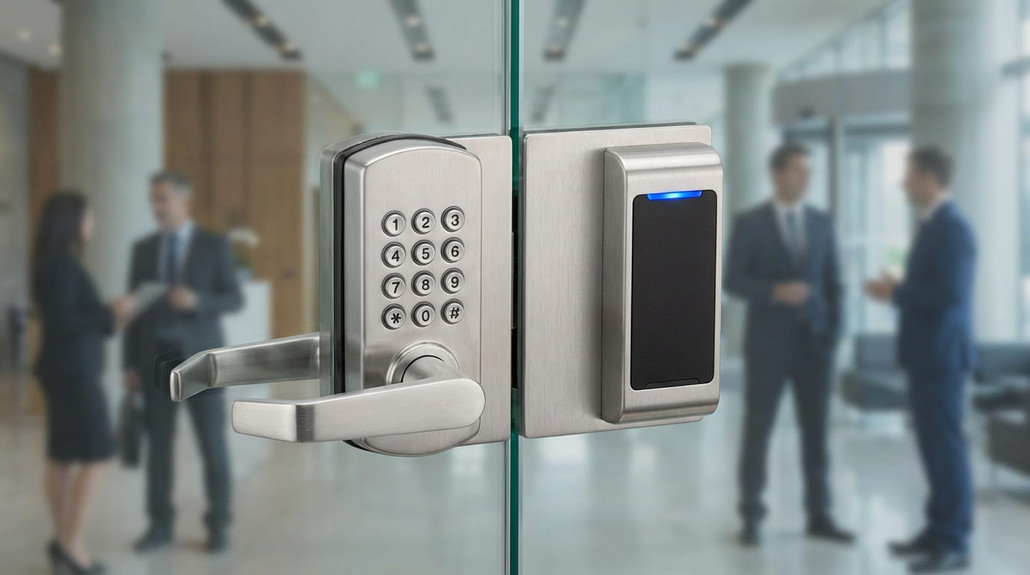
Keypad vs Proximity Entry for Doors: Detailed Comparison
Posted by National Lock Supply on Feb 13th 2026
Keyless entry sounds simple—until you’re the one responsible for making it work every day. The “right” solution isn’t just about convenience. It’s about how the door is used (public traffic vs staff-only), how access is managed (one code vs many users), what happens when power fails, and how much maintenance the site will actually tolerate. That’s why choosing between keypad and proximity entry is really a decision between mechanical simplicity, electronic flexibility, and system-level control.
This guide breaks the category down the way pros typically spec it: start with operational needs, then choose the technology that matches those needs without introducing unnecessary complexity. If you’re replacing an existing setup, it’ll also help you avoid the most common misfit issues—door prep, power assumptions, and “features” the building never ends up using.
Start Here: The 60‑Second Pick
If you want the fast direction, use this:
- If the site wants keyless entry with minimal maintenance and doesn’t need audit trails or lots of user management, start with mechanical pushbutton hardware.
- If the site needs multiple user codes, schedules, and easier user changes, an electronic keypad lock is often the clean step up.
- If the site needs proximity credentials (fobs/cards) or wants keypad + proximity as part of a broader access control approach, you’re usually in wall-mounted keypad/reader territory controlling an electrified locking method.
From there, the “right” choice becomes obvious once you answer two questions: Who manages access? and How often will access change?
Mechanical Pushbutton: The “No Power, No Problem” Option
Mechanical pushbutton locks are popular because they solve the biggest operational headache in access control: batteries and power dependencies. There’s no programming app, no battery schedule, and no “it failed because someone ignored the low-battery warning.” For many doors, that’s the entire point—reliable keyless entry without electronic overhead.
Mechanical pushbutton options make the most sense when:
- Access changes are infrequent (same users most of the time)
- The property wants simplicity over advanced features
- The environment is rough on electronics (abuse, neglect, or inconsistent maintenance)
If that’s your use case, start by exploring Mechanical Pushbutton Locks and match your door prep and function before you worry about anything else.
The tradeoff is flexibility. Mechanical pushbutton is a great “set it and forget it” tool—but it’s not the best fit when you need frequent user updates, time-based permissions, or the ability to manage multiple codes easily at scale.
Electronic Keypad Locks: Better User Management Without Full Access Control
Electronic keypad locks are often the sweet spot when a building needs better user control than mechanical pushbutton—without committing to a full credential system. They’re commonly chosen when a property wants multiple codes, easier updates, and a more modern entry experience, while still keeping the system at the door (instead of requiring panels, credential enrollment, and broader infrastructure).
Electronic keypad locks are usually a strong fit when:
- You need multiple users/codes and the roster changes
- You want features like temporary codes or easier updates
- You can realistically maintain batteries or power (and the site will do it)
To evaluate what fits your situation, browse Electronic Keypad Locks and focus on the operational features you’ll actually use—not the ones that look good in a spec sheet but never get configured.
The main tradeoff is that you’re now managing power (battery or hardwired) and adding a layer of “smart” behavior that needs to be supported. If the site is known for ignoring maintenance, mechanical may still be the better long-term decision.
Proximity Entry: When You Need Credentials, Not Just Codes
Proximity entry changes the entire user experience. Instead of sharing codes, you’re issuing credentials (cards/fobs), which is often cleaner in multi-user environments—and significantly easier to revoke when someone leaves. Many facilities prefer this simply because it feels more controlled: credentials come and go without everyone learning a new code.
Most “proximity” setups start with a wall-mounted device that can accept PINs, credentials, or both, then trigger an electrified locking method. If that’s the direction you’re going, explore Wall Mount Keypad Reader options first—because this is where you’re deciding the interface users will touch every day.
The advantage of this approach is scalability: it’s easier to manage many users. The tradeoff is complexity: you’re now building a system, not just installing a lock.
The Locking Method Matters More Than People Expect
Here’s where a lot of “keypad vs proximity” conversations go sideways: the reader is only the front end. The door still needs a locking method that releases reliably, matches the door prep, and behaves correctly during power loss. That’s why spec’ing the lock side alongside the credential side prevents most real-world failures.
Two common paths:
Path A: Electrified lock hardware at the door
If the opening needs a robust mechanical base with electrified control layered in, many commercial systems rely on electrified lock hardware. If that’s your direction (especially for high-traffic commercial doors), review Electrified Cylindrical Locks while you’re choosing your keypad/reader—because the lock function and door prep must match the opening.
Path B: Reader triggers a release device
In other setups, the reader triggers a release device that allows the door to open when authorized. A very common example is pairing a credential/keypad system with an electric strike. If that’s your plan, it helps to keep strike selection in the same buying flow as the reader decision—start with Cylindrical Electric Strikes so the release method you pick aligns with your door hardware.
The Practical “Choose the Right System” Process
If you want a method that works across most commercial doors, use this:
1) Decide how access will be managed. One code shared? Multiple users? Credentials? Frequent turnover?
2) Match the technology to the maintenance reality. If the site won’t manage batteries and updates, choose simpler hardware.
3) Choose the user interface. Code-only keypad vs keypad + credentials (reader) changes behavior and control.
4) Spec the lock/release method at the same time. A great reader won’t fix the wrong locking method.
5) Plan for change. If access changes often, choose the system that makes change easy.
Common Mistakes That Create Headaches
Choosing electronic features the site won’t maintain A “better” keypad becomes a worse system when batteries are ignored or updates aren’t managed.
Using codes when credentials are needed High turnover environments typically do better with credentials than shared PINs.
Separating the reader decision from the lock decision Most failures happen at the locking method and release behavior—not the keypad itself.
Overcomplicating a simple door If it’s a single staff door with stable users, mechanical pushbutton can outperform more complex systems long-term.
FAQs
Is proximity more secure than a keypad?
It can be, mainly because credentials are easier to revoke and manage. But real security depends on the full system: locking method, installation quality, and operational control.
When is mechanical pushbutton the best choice?
When you want keyless access with minimal maintenance and access doesn’t change constantly.
When should I choose a wall reader instead of an electronic keypad lock?
When you need credentials (cards/fobs), want keypad + credentials, or need the system to scale with many users and easy revocation.
What’s the most common reason these installs fail?
Mismatch between the access method and the locking method—plus unrealistic maintenance expectations.
Why Buy Keypad & Proximity Entry at National Lock Supply
The most expensive “mistake” with keyless entry isn’t buying the wrong keypad—it’s installing a solution that doesn’t match how the site operates, then paying for ongoing service calls and workarounds. National Lock Supply makes it easier to build the right setup by letting you shop the decision in the same way pros spec it: start with the interface category (Mechanical Pushbutton Locks, Electronic Keypad Locks, or Wall Mount Keypad Reader), then align it with a dependable door solution like Electrified Cylindrical Locks or a release method such as Cylindrical Electric Strikes. That category-first workflow helps you choose the right complexity level, match the door prep correctly, and end up with an entry system that
How to Choose an Exit Door Alarm
Meta Title (≤65): How to Choose an Exit Door Alarm Meta Description: Learn how to choose an exit door alarm by use case, door type, and reset method. Compare alarm types, power options, and tips to reduce nuisance alarms.
Exit door alarms sit at the intersection of two priorities that don’t always get along: life safety and loss prevention. You want emergency exits to work exactly as intended in an emergency—but you also want to stop “wrong door” usage, theft exits, and unauthorized departures that create real risk for retail, healthcare, schools, and secured facilities.
Choosing the right alarm is less about finding the loudest device and more about matching the alarm type to the opening: how the door is used, who should be allowed to open it (and when), what “reset” should look like, and whether you’re adding an alarm to an existing exit device or you need a complete exit hardware solution.
Start Here: The 60‑Second Pick
If you want the fast direction, start with what you’re trying to prevent.
If the goal is to deter and notify when someone opens a door they shouldn’t, start by exploring Exit Alarms and narrow based on reset method and how the alarm is triggered. If the door already has panic hardware and you want the alarm behavior integrated into that system, your selection process usually shifts toward the device and its operating side—especially when trim function matters.
The point is simple: pick the alarm approach that fits the door’s reality, not the one that looks best in a spec sheet.
What Exit Door Alarms Actually Solve
Exit alarms are most commonly used to:
- Reduce “wrong door” usage (people leaving through non-public exits)
- Deter theft exits in retail (alarm draws attention immediately)
- Prevent unauthorized egress in monitored environments (schools, healthcare)
- Add accountability without blocking emergency egress
A well-chosen alarm creates a strong deterrent without training staff to disable it, prop the door, or ignore it.
The Three Alarm Approaches You’ll See Most Often
1) Standalone door alarms (straight deterrence + notification)
These are typically used when you want clear, immediate signaling if the door opens. The biggest decision here is how the alarm is armed/disarmed and how it resets (keyed reset, timed reset, controlled bypass, etc.). This is the most common “add an alarm to a door” scenario.
2) Alarm behavior integrated with exit devices
If the door already has panic hardware—or the opening requires it—your alarm decision often becomes part of the exit device spec. This matters because panic hardware isn’t just a “push bar”; it’s a life-safety device with its own fitment and function considerations. If you’re choosing or upgrading the core panic device on the opening, start with Panic Exit Devices and then decide how you want alarm behavior handled.
3) “System” alarms with controlled release and electrified components
Some openings need alarm behavior coordinated with access control, electrified trim, or timed release logic. In those cases, power and control aren’t afterthoughts—they’re the difference between a clean install and constant nuisance issues.
The Decision That Matters Most: How the Alarm Resets
Reset is where real-world installs succeed or fail.
- If reset is too easy, the alarm becomes meaningless.
- If reset is too hard, staff will create workarounds.
- If reset requires the wrong person at the wrong time, you get “alarm fatigue” and bypass behavior.
When you’re choosing, ask:
- Who should be able to reset it?
- How often will it actually need to be reset?
- Does the door ever need an authorized “quiet exit” (deliveries, staff operations)?
Your reset plan should reflect operations, not ideal behavior.
Trim Function and Control: Where Many Specs Get Messy
On doors with exit devices, trim isn’t just aesthetics—it controls how the opening behaves from the exterior side (and in some cases, how it’s managed during different schedules). This is where many jobs become inconsistent: the device is correct, but the exterior trim function doesn’t match how the building expects the door to be used.
If your alarm plan involves panic hardware and you need to match the right exterior operation, it helps to browse Exit Device Trims and align trim function with the door’s role (public entry, staff-only, controlled access, etc.). Done right, you reduce the “people using the wrong exit” problem without making the opening frustrating to operate.
Power: The Hidden Source of Nuisance Alarms and Inconsistent Behavior
Any alarm setup that relies on electrified components or controlled timing needs stable power. Underpowered systems create the exact issues you’re trying to avoid: random triggering, inconsistent reset behavior, and “sometimes it works” release logic.
If your application includes electrified exit components or you’re coordinating alarm behavior with electrified exit hardware, start your power plan with Exit Device Power Supply and build outward from a stable foundation. That one decision prevents a surprising amount of troubleshooting later.
Placement and “Nuisance Alarm” Prevention
Most nuisance problems aren’t product problems—they’re usage problems.
A few practical ways to reduce nuisance alarms:
- Don’t place “emergency exit only” doors directly in the natural path of travel unless the site is prepared for frequent alarms.
- Make sure signage and staff training match the alarm plan (so the door isn’t used casually).
- If authorized staff need regular access, build an intentional bypass/reset process rather than relying on someone “figuring it out.”
And when compliance is part of the equation, always confirm requirements with the AHJ/inspector for the site—especially for doors that are part of an egress path.
Common Mistakes That Create Callbacks
Choosing an alarm without deciding who resets it This is the #1 reason alarms get bypassed or ignored.
Treating a panic door like a standard door Doors requiring panic hardware need correct device selection, fitment, and trim function.
Ignoring power and control requirements Electrified or controlled-release setups demand stable power—otherwise the system becomes unreliable.
Installing alarms where people will naturally use the door If a door is in the path of travel, alarms become constant unless operations align.
FAQs
Do exit door alarms block emergency egress?
They’re typically used to deter and notify, not to prevent egress. Always confirm the door’s egress requirements and local expectations with the AHJ.
Should I choose a standalone alarm or an alarmed exit device approach?
Standalone is common when you’re adding deterrence to an existing door. Integrated approaches make sense when the door already has panic hardware or needs a complete exit device solution.
What’s the best reset method?
The best reset method is the one that matches operations: secure enough to matter, but practical enough that staff won’t bypass it.
Why do exit alarms become “noise” over time?
Because reset/operations weren’t planned. The alarm gets triggered too often, staff gets desensitized, and bypass behavior starts.
Why Buy Exit Door Alarms at National Lock Supply
When you’re choosing exit door alarms, the expensive failure isn’t the device—it’s the operational friction that causes nuisance alarms, bypass behavior, and repeat visits to “fix” a system that was never matched to the opening. National Lock Supply makes it easier to spec the correct approach by organizing the full exit ecosystem in one place—whether you’re starting with Exit Hardware for the complete category view, narrowing into alarms, selecting the right panic device foundation, matching trim function to door behavior, or planning power correctly for electrified exit applications.