 SAME DAY & EXPEDITED SHIPPING AVAILABLE






How to Choose a Request-to-Exit Device (REX)
Posted by National Lock Supply on Feb 16th 2026
Request-to-exit devices are one of those components you only notice when they’re missing—or when they’re chosen wrong. In a controlled-access opening, you need the secure side to release predictably for authorized egress without creating nuisance releases, unsafe workarounds, or “sometimes it works” behavior. That’s exactly what a REX device is for: it tells the system “someone is exiting” so the lock can release the way the opening was intended to behave.
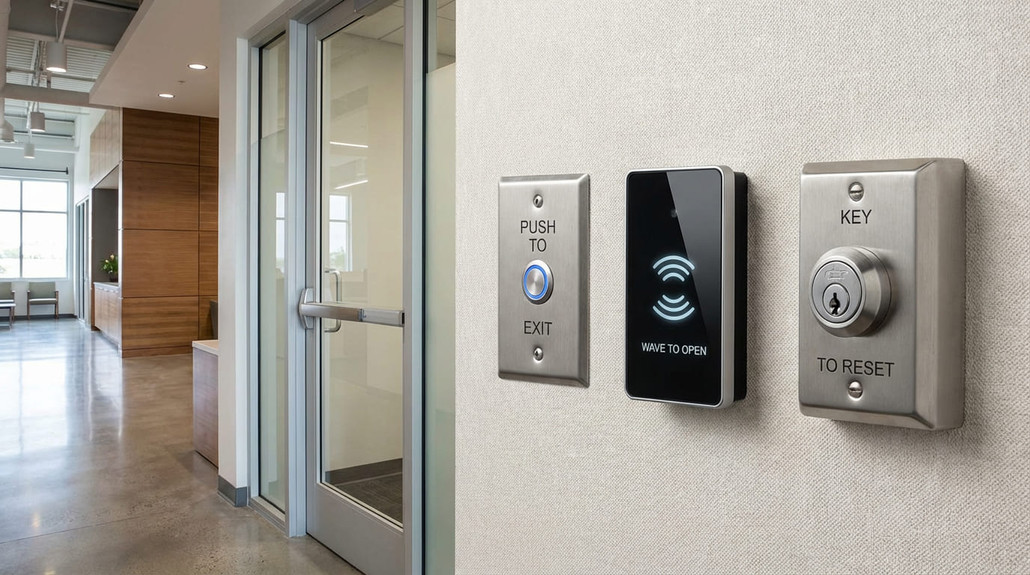
But “REX” isn’t one product. It’s a category of solutions, and the right choice depends on how the door is used, how much control you want, and what type of locking method you’re releasing. This guide breaks down the real differences between push buttons, touchless sensors, and key switches—then gives you a simple way to choose what fits your opening.
Start Here: The 60‑Second Pick
If you want the quickest direction, use this:
- Public-facing exits and everyday egress: start with a push button style REX—simple, intuitive, and easy to understand for any user.
- Clean, hands-free traffic or accessibility-driven openings: consider a touchless sensor, but plan carefully to avoid false triggers.
- Staff-only doors or controlled release points: a key switch can be the right move when you want deliberate, authorized release (not “anyone can press it”).
If you’re shopping the category first (the best way to avoid picking the wrong style), begin with Push Buttons Egress Devices and then narrow based on how your door is actually used.
What a REX Device Does (In Plain English)
A request-to-exit device is the “signal” component on the secure side of a door. When it’s triggered—by a press, motion, or key turn—it tells the access system to release the locking method for a defined time.
In the field, the goal is not just “release.” The goal is predictable release: the door unlocks when it should, stays locked when it should, and doesn’t create problems for the people using it or maintaining it.
That’s why the best REX choice is always tied to the lock style you’re controlling and the environment around the opening.
Button vs Sensor vs Key Switch: The Real Differences
Push button REX: the default for a reason
Push buttons are popular because they’re obvious, intentional, and easy to troubleshoot. Users understand what to do, and technicians can diagnose issues quickly.
Push buttons are usually the right fit when:
- You want a clear, deliberate action (“press to exit” behavior)
- You need something simple for mixed public traffic
- You’re trying to minimize false releases
This is why most systems start here—and why it’s worth reviewing Push Buttons Egress Devices even if you think you want something “more advanced.”
Touchless sensor REX: great in the right environment, annoying in the wrong one
Touchless sensors can be excellent for clean traffic flow and accessibility—but they’re also the easiest to misapply. A poorly placed sensor can trigger from someone walking past, turning a secure opening into a nuisance-release door.
Touchless sensors often make sense when:
- You want hands-free egress for hygiene or accessibility
- The area around the door is controlled enough to prevent random triggering
- You can place the sensor where it’s clearly tied to “exiting,” not passing by
Key switch REX: controlled release for staff-only behavior
Key switches are not about convenience—they’re about control. They’re commonly used where you want the secure side release to be deliberate and restricted to authorized staff.
Key switches often make sense when:
- You want to prevent casual releases in sensitive areas
- The opening is staff-managed (not public-facing)
- You need a defined override behavior without relying on someone holding a button
Match the REX Choice to the Locking Method
REX selection isn’t just about the wall device—it’s about what you’re releasing.
If you’re releasing a maglock
Maglocks are often used where fail-safe behavior is required, and the release pathway needs to be consistent and well-supported. In maglock openings, REX is part of the “release ecosystem,” so placement and reliability matter even more. If your opening uses magnetic locking, it helps to think in that specific hardware context while planning: Magnetic Locks.
If you’re releasing an electric strike
Electric strikes are a different feel—release is often about timing and latch engagement rather than holding force. REX still matters, but the failure mode tends to be “release timing doesn’t match how the door is used.” If your system is built around strikes, keeping that in mind while choosing REX can prevent a lot of service calls: Electric Strikes.
Placement: The Detail That Separates “Works” From “Works Well”
Most REX problems aren’t product problems—they’re placement problems.
A few practical principles:
- Place the device where a user naturally reaches when they intend to exit (not where people pass by casually).
- Avoid locations that encourage “leaning” or accidental activation.
- For sensors, plan specifically around the detection zone so normal traffic doesn’t trigger releases.
If you’re trying to reduce nuisance calls, it’s better to spend extra time on placement than to “upgrade” to a more complex device.
Wiring & Timing: Keep It Simple, Keep It Predictable
Most REX devices are just a contact that changes state (NO/NC) and signals a controller, relay, or power supply input. The two mistakes that cause the most problems are:
1) Wrong timing behavior (door releases too long or not long enough) 2) No separation between “release signal” and “power stability”
That’s why the “little components” matter. Relays, timers, and interface parts are often what turn a basic REX setup into a clean, predictable door. If you need those supporting pieces, plan them from the start using System Accessories.
And because none of this matters if the power is unstable, the power supply itself should be sized and configured to support the release behavior you want—especially when multiple devices share the same cabinet. If you’re speccing the system end-to-end, start with Access Control Power Supply and build the release path around a stable foundation.
Common Mistakes (That Make Good Doors Feel Bad)
Choosing a sensor for a busy corridor If people pass near the door constantly, you may create false triggers and reduce security.
Using a button where control is required In staff-only areas, a simple button can be too permissive depending on your security goals.
Ignoring timing and interface parts Without the right relay/timer behavior, even the correct REX choice can feel inconsistent.
Treating every lock type the same Maglocks and strikes behave differently. Match the REX plan to the locking method.
FAQs
Is a touchless sensor always “better” than a button?
Not automatically. Sensors work best in controlled environments where detection can be tuned to intentional exit behavior.
When should I use a key switch instead of a button?
When you want release to be staff-only or deliberate—especially in restricted areas.
Does REX selection affect safety and compliance?
It can. Openings have different requirements depending on occupancy and local interpretation, so always confirm expectations with the AHJ/inspector for that site.
Why does my door release when no one is exiting?
Usually placement, detection zone issues (for sensors), or interface/timing setup—not the “quality” of the device.
Why Buy Request-to-Exit Devices at National Lock Supply
The fastest way to avoid misorders with REX devices is to shop within the correct category first, then narrow based on real variables: traffic pattern, control needs, placement constraints, and what locking method you’re releasing. National Lock Supply makes that workflow straightforward by grouping the pieces you actually spec together—starting with Push Buttons Egress Devices, then supporting clean installs with System Accessories and stable Access Control Power Supply options, plus the lock-method context you need for the opening (like Magnetic Locks and Electric Strikes). That category-first approach mirrors how pros build reliable egress: choose the right release method, place it correctly, wire it cleanly, and make the system behave the same way every time.
Access Control Accessories That Prevent Service Calls
Meta Title (≤65): Access Control Accessories That Prevent Service Calls Meta Description: The access control accessories that improve reliability and reduce callbacks. Learn what to add, when you need it, and how to spec a clean install.
Most access control problems aren’t caused by the “big” components. The reader works. The lock works. The credentials scan. Then the door still behaves inconsistently: it buzzes, releases late, won’t hold, randomly drops during peak traffic, or becomes a troubleshooting magnet every few weeks. When that happens, the fix is rarely replacing the primary device—it’s adding the supporting parts that make the system predictable.
This guide covers the accessories that installers and integrators reach for to prevent service calls: relays and interface modules, timers, overrides, request-to-exit components, and the small pieces that turn a basic install into a stable one. If you want to browse what those parts look like in one place, start with System Accessories and then use the scenario sections below to spec only what you actually need.
Start Here: The 60-Second Checklist
If you want the fastest “do we need accessories?” answer, check these five conditions:
- Are you powering more than one device from a single cabinet?
- Do you need timed release, delayed actions, or special unlock behavior?
- Do you need manual override from inside or at a desk?
- Is the opening sensitive to false triggers or nuisance release?
- Are you seeing power-related instability (buzzing, chatter, random drops)?
If you said “yes” to any of those, accessories aren’t optional—they’re how you stabilize behavior.
The “Must-Have” Accessories Most Systems Benefit From
1) Relays and interface modules
Relays are the workhorse accessory in access control. They let you isolate circuits, protect controllers, and create clean signal behavior between devices that were never designed to speak directly.
Relays are especially useful when:
- You’re adding devices to an existing controller
- You need to separate the “signal” from the “load”
- You want to prevent a single failure from taking down a whole opening
Most pro installs keep these on hand because they solve weird problems fast—and they live where you’d expect: System Accessories.
2) Timers and delay modules
If the system needs to unlock for a specific window, latch relock properly, or avoid rapid cycling, a timer module often prevents the “door feels inconsistent” complaint.
Timers matter when:
- Users need longer release time (carts, accessibility, traffic flow)
- The lock releases but relocks too fast
- You need consistent behavior across multiple openings
3) Manual overrides (key switches and control inputs)
Overrides are not about convenience—they’re about operations. When staff need a controlled way to release or hold a door, overrides prevent workarounds (propping, wedging, bypass wiring) that create bigger problems later.
Match Accessories to the Two Biggest Failure Modes
Most real-world access control issues fall into one of two buckets: power instability or signal/behavior instability.
Bucket A: Power instability (buzzing, chatter, random drops)
If the lock buzzes, chatters, drops under load, or behaves differently at different times of day, power is usually the first suspect. Accessories can help, but the foundation is your supply.
If you’re seeing these symptoms, confirm the supply is correctly sized and configured by starting with Access Control Power Supply. Undersized power supplies and poor distribution create “ghost issues” that look like hardware failures but are really electrical behavior.
Bucket B: Signal/behavior instability (late release, false triggers, inconsistent unlock)
If the door releases sometimes but not always, or it releases when it shouldn’t, you’re usually dealing with signal and interface behavior. That’s where relays, timers, and proper triggering inputs matter.
Scenario Map: “If This Happens, Add That”
Scenario 1: The door releases inconsistently during traffic
This often happens when multiple devices share a supply and the system hits peak load. Confirm supply sizing first, then consider output separation and interfaces.
Start with the supply foundation: Access Control Power Supply Then support behavior control with: System Accessories
Scenario 2: You need a clean exit release path (without nuisance)
Request-to-exit and release inputs are where good installs become stable installs. The right device choice matters, but the integration matters just as much.
If you’re selecting exit devices or inputs, begin with Push Buttons Egress Devices, then add interfaces/timers as needed to make release predictable.
Scenario 3: You want controlled staff override (not public)
When staff need to unlock, hold, or override an opening, the system needs a deliberate control method. Overrides reduce “creative fixes” that cause damage and future failures.
Many override and interface parts are typically selected from System Accessories, depending on how your controller expects inputs.
Scenario 4: You’re using magnetic locking and want consistent release
Maglocks are sensitive to clean power and predictable release signaling. A good accessory plan helps prevent nuisance release and “it holds until it doesn’t” behavior.
If the locking method is magnetic, plan accessories in that context by browsing Magnetic Locks and then supporting with the right interfaces and power distribution.
Scenario 5: You’re using electric strikes and timing feels off
Strikes often fail “behaviorally” when timing doesn’t match traffic or latch engagement. Accessories that control release timing and signal separation often solve these issues without swapping the strike.
If your opening is strike-based, keep the lock method in mind by reviewing Electric Strikes and then spec timing and interfaces around that behavior.
The “Small Parts” That Save Big Time
Even when you pick the right power supply and the right lock, the system still needs practical build quality:
- Clean separation between signal and load
- Predictable release timing
- Manual override paths where operations require them
- Protection from “one fault takes everything down” behavior
That’s why the category most installers revisit constantly is System Accessories—because it’s where the practical stability tools live.
FAQs
Do accessories really matter if the main hardware is correct?
Yes. Most callbacks are behavior problems, not “bad hardware.” Accessories create predictable behavior.
Should I start with accessories or the power supply?
If the symptoms are buzzing/chatter/random drops, start with the power supply. If it’s inconsistent triggering, start with interfaces and release inputs.
What’s the most common accessory mistake?
Skipping relays/timers because the system “works in the shop.” Field conditions are different: wire runs, load peaks, and user traffic expose weak behavior fast.
How do I avoid over-spec’ing accessories?
Spec by scenario. Only add what solves a real behavior or operational need.
Why Buy Access Control Accessories at National Lock Supply
The fastest way to reduce callbacks is to build an access control system that behaves predictably under real field conditions. National Lock Supply makes that easier by organizing the accessories and supporting categories pros actually spec together: System Accessories for relays/timers/interface parts, Access Control Power Supply for stable power distribution, Push Buttons Egress Devices for clean release signaling, and lock-method categories like Magnetic Locks and Electric Strikes to keep your accessory plan aligned with how the opening actually locks and releases. That category-first workflow mirrors the way reliable systems are built: stable power, clean signals, controlled release, and the small parts that prevent big problems.